
Getting the right balance of staffing and scheduling can be tricky, especially when you're dealing with high volumes of customers. A queue management system can make this a lot easier by automating how customers flow through your business and reducing wait times.
With queue management system software, you can keep track of customer traffic in real-time and ensure the right staff is available when needed.
Whether you're in retail, healthcare, or any other service industry, a customer queue management system can help you optimize both staffing and scheduling.
In this blog, we'll dive into how a queue management system can help make your operations run smoother and keep customers happy.
What Is Staffing and Scheduling in a Queue Management Context?
In a queue management system context, staffing and scheduling go beyond the traditional approach of simply planning shifts. It's about aligning the right number of staff with customer demand at any given moment, ensuring smooth operations and quick service.
When customers are waiting in line or being served, the length of the queue, wait times, and the volume of service requests directly affect how many staff members are needed. For example, longer queues or more customers during peak hours may require extra hands on deck to avoid delays and maintain service quality.
Real-time and historical queue data play a crucial role in this process. By analyzing past trends and monitoring live customer flow, you can make data-driven decisions to adjust staffing levels dynamically and ensure optimal service delivery.
The Link Between Queue Management and Employee Performance
Managing queues effectively is crucial to ensuring staff are not overworked or underutilized. When queues are too long, staff face increased pressure to serve customers quickly, leading to stress and potential mistakes. On the other hand, uneven visitor distribution can result in some staff members being idle while others are overwhelmed. The following table demonstrates how queue management impacts employee performance:
Scenario | Queue Management Impact | Employee Performance |
High Wait Times | Increased pressure on staff to serve faster | Leads to stress, errors, and slower service |
Uneven Visitor Distribution | Some staff face overload, while others experience idle time | Leads to frustration, inefficiency, and burnout |
Real-Time Data Matching Staff | Adjust staffing based on live queue data | Improves efficiency, reduces stress |
Staffing During Peak Periods | Appropriate staffing levels during busy times | Ensures smoother service and happier employees |
Avoiding Overstaffing | Fewer staff during quieter times | Optimizes resources and reduces idle time |
You might also like - Ticket-Based vs Virtual Queue Systems for City Halls and Government Offices
Key Staffing KPIs a Queue Management System Can Track
A queue management system provides powerful tools for tracking staffing KPIs, allowing businesses to make data-driven decisions that enhance efficiency, improve service, and optimize resource allocation. These KPIs give you real-time insights into employee performance, helping to fine-tune staffing and scheduling processes.
1. Average Number of Visitors Served per Staff Member
This KPI tracks how many customers each staff member serves in a set time period, giving you clear visibility into individual productivity. By monitoring this metric, you can spot which staff members are handling more visitors and which might need additional support.
Helps balance workloads across the team to avoid burnout or underutilization.
Enables better staffing decisions, ensuring the right number of employees are available during peak times.
Provides insights into staff performance, highlighting areas where training or support may be needed.
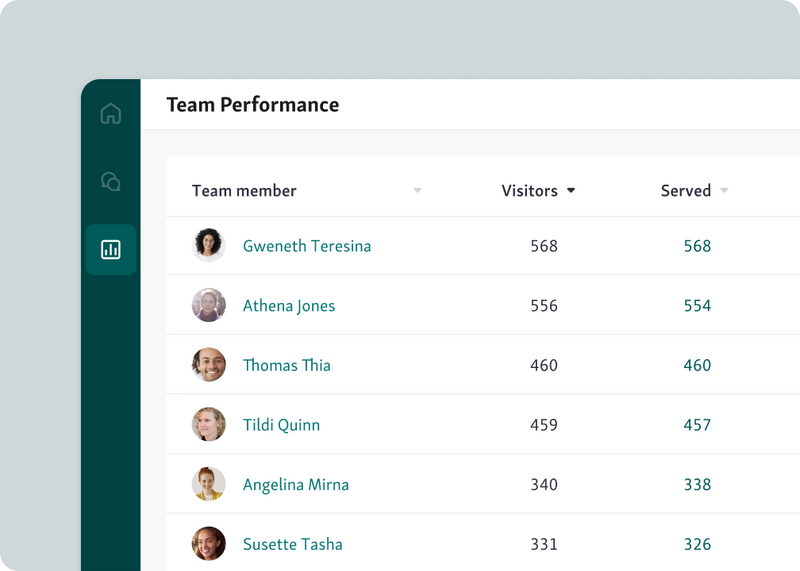
This KPI is essential for making sure your team operates efficiently, maintaining service quality while avoiding both overstaffing and understaffing.
2. Average Wait Time
Tracking average wait time helps you identify potential bottlenecks or understaffing issues in real time. When wait times are consistently long, it signals that either more staff is needed or that the flow of customers isn’t being managed efficiently. This KPI is crucial for ensuring a smooth, efficient experience for both your staff and customers.
Helps pinpoint areas where you’re falling short in service speed.
Acts as an early indicator of understaffing or operational inefficiencies.
Provides data to adjust staffing levels during peak times or adjust processes to reduce delays.
Qminder's service intelligence can track wait times in real-time, providing valuable insights that help optimize staff scheduling and improve overall service delivery. With this data, you can adjust in-the-moment, making smarter, more data-driven decisions.
3. Average Service Time
Tracking average service time helps identify training gaps or inefficiencies in your processes. When services consistently take longer than expected, it could indicate that staff members need more training or that there are obstacles slowing down the service process.
Highlights where service times are longer than planned, signaling potential process bottlenecks.
Helps identify which services or staff members are taking more time than necessary, allowing you to provide targeted training.
Supports process optimization by pinpointing areas where service delivery can be improved.
By analyzing average service time data from your queue management system software, you can streamline processes, reduce delays, and ensure smoother, faster customer service.
4. No-Shows and Cancellations
Tracking no-shows and cancellations helps you understand how missed appointments impact your staffing and scheduling plans. When clients don't show up or cancel last minute, it can throw off staffing levels, leaving employees either underutilized or overwhelmed.
Helps you adjust staffing in real time, ensuring you’re not overstaffed during quiet periods or understaffed when appointments are rescheduled.
Identifies trends in cancellations, enabling you to refine your reminder and booking policies to reduce no-shows.
Provides data for optimizing your schedule, ensuring that empty time slots are filled and resources are better allocated.
By using queue management system software to track no-shows and cancellations, you can better align your staff with actual demand, improving efficiency and reducing wasted resources.
Also read - How Service Dashboards Help Reduce No-Shows and Long Wait Times
How Does Better Staffing Impact Employee Experience?
Effective staffing and scheduling directly impact employee experience by reducing stress, improving job satisfaction, and enhancing workforce productivity. When staff feel supported with the right resources at the right time, it leads to a more positive work environment and better service delivery.
1. Reduced Stress and Burnout
When staff are scheduled based on actual customer demand, they’re less likely to feel overworked during peak times or underutilized during slow periods. This balance reduces stress, prevents burnout, and helps employees maintain a healthy work-life balance.
2. Increased Job Satisfaction
Well-balanced staffing creates a smoother workflow, allowing employees to focus on delivering quality service rather than dealing with excessive workloads. When team members feel more in control of their work, job satisfaction naturally improves.
3. Better Work-Life Balance
Proper scheduling ensures employees have time off when needed and aren’t constantly being asked to cover additional shifts. A better work-life balance leads to happier employees, less absenteeism, and greater retention.
Read more - What is the Customer Experience Pyramid?
How Can Managers Use Queue Insights for Long-Term Workforce Planning?
Managers can leverage queue insights to build a more efficient workforce, ensuring that the right number of staff is always available at the right times. By using queue management system software, you can analyze data that helps inform long-term staffing strategies. Here’s how you can use these insights effectively for workforce planning:
1. Analyze Historical Data to Identify Patterns
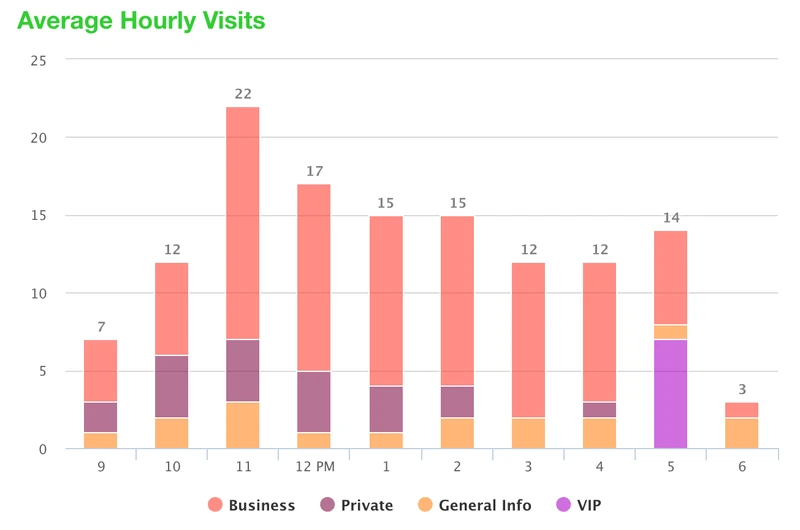
Start by reviewing historical queue data to spot trends in customer flow. Look for peak hours, days, and seasonal shifts that have historically impacted service demand.
With this data, managers can forecast when staffing needs will be high or low, ensuring you’re prepared for busy periods. For example, if you consistently see a spike in demand during weekends or holidays, you can plan to schedule more staff during those times.
2. Adjust Staffing in Real-Time Based on Live Data
Real-time queue data gives you the flexibility to make staffing adjustments as customer demand fluctuates throughout the day. If the queue is growing faster than expected or if you see that some staff are underutilized, you can quickly reallocate resources.
For instance, if wait times are increasing, you can add staff during peak hours to speed up service. This helps maintain a smooth flow of customers and reduces the risk of overwhelming your team.
3. Match Workforce Skills to Service Demand
Tracking the types of services being requested most often allows you to match the right skills with demand.
For example, if certain services require specialized knowledge, make sure that employees with those skills are scheduled during peak demand times for those services. This ensures that not only is the right number of staff present, but they are also equipped to handle specific customer needs, improving overall service quality.
4. Plan for Seasonal and Unpredictable Demand
Utilizing both historical and real-time data helps anticipate busy periods like holidays, sales events, or seasonal spikes in customer visits. By analyzing past years’ data, you can predict when these busy times will occur and adjust your staffing levels accordingly.
This proactive planning allows you to hire temporary staff in advance or shift full-time workers to accommodate expected increases in demand, ensuring you’re always prepared for the unexpected.
5. Optimize Scheduling to Avoid Over or Understaffing
With continuous access to queue management system software, you can fine-tune your appointment scheduling strategy. Use the data to ensure that you aren’t overstaffing during slow periods or understaffing during busy times.
For instance, if your system shows that customer traffic is lower on Tuesday afternoons, you can schedule fewer employees without sacrificing service quality. Conversely, if you see more visitors during lunch hours, you can schedule additional staff to manage the rush effectively.
6. Use Queue Data to Inform Recruitment Needs
As you gather more insights from your queue management system, you'll be able to predict whether your current staff levels meet demand or if you need to hire additional workers.
If the data shows that certain shifts are consistently understaffed or that customer service is suffering due to a lack of personnel, it’s a clear signal that it may be time to recruit more employees or hire seasonal workers. This ensures that you don’t wait until the problem becomes urgent.
See also - The ROI of Queue Analytics for Enterprises
Take Control of Your Workforce with Queue Insights
With queue insights, you can optimize staffing and scheduling, reduce inefficiencies, and improve employee experience. Understanding peak demand, adjusting staffing in real-time, and aligning staff skills with customer needs ensures smoother operations and better service delivery.
Predicting seasonal demand and optimizing scheduling based on historical data further strengthens your workforce planning. With the right tools in place, such as Qminder, you can manage your workforce effectively and make data-driven decisions.
Start using Qminder today to take your workforce management to the next level.
A well-implemented queue management system reduces wait times, ensures balanced workloads, and prevents staff burnout by adjusting staffing levels based on real-time demand. This leads to a more manageable and less stressful work environment for employees.
Yes, by analyzing historical data, you can forecast busy periods, trends, and seasonal demand. This allows you to plan for additional staffing needs well in advance, ensuring you're always prepared to meet customer demand.
Real-time data allows managers to make immediate adjustments to staffing based on customer flow, wait times, and service demand. This flexibility ensures that staffing levels are always aligned with actual demand, improving service speed and operational efficiency.
Get to know our solutions
We will give you a short but great overview of how Qminder can improve your business and visitors experience.
Try out Qminder for yourself and see how we can improve your business and visitors experience.